You receive an email stating your bank account has been locked. It looks professional, includes the bank’s logo, and asks you to verify your information to restore access. Everything seems normal until you notice that the message came from an unfamiliar email address. This is how many phishing scams begin. Instead of directly attacking a computer or network, scammers use convincing messages to make people share information they would normally keep private. A single careless click can expose login credentials, financial details, or sensitive business information.
A Phishing Email can target anyone, whether they use email for online shopping, banking, work, or personal communication. Understanding how these messages work makes it easier to recognize suspicious requests before they cause damage. In this guide, you’ll discover seven realistic phishing email examples, the warning signs to look for, and practical ways to protect your accounts and personal information.
What Is a Phishing Email?
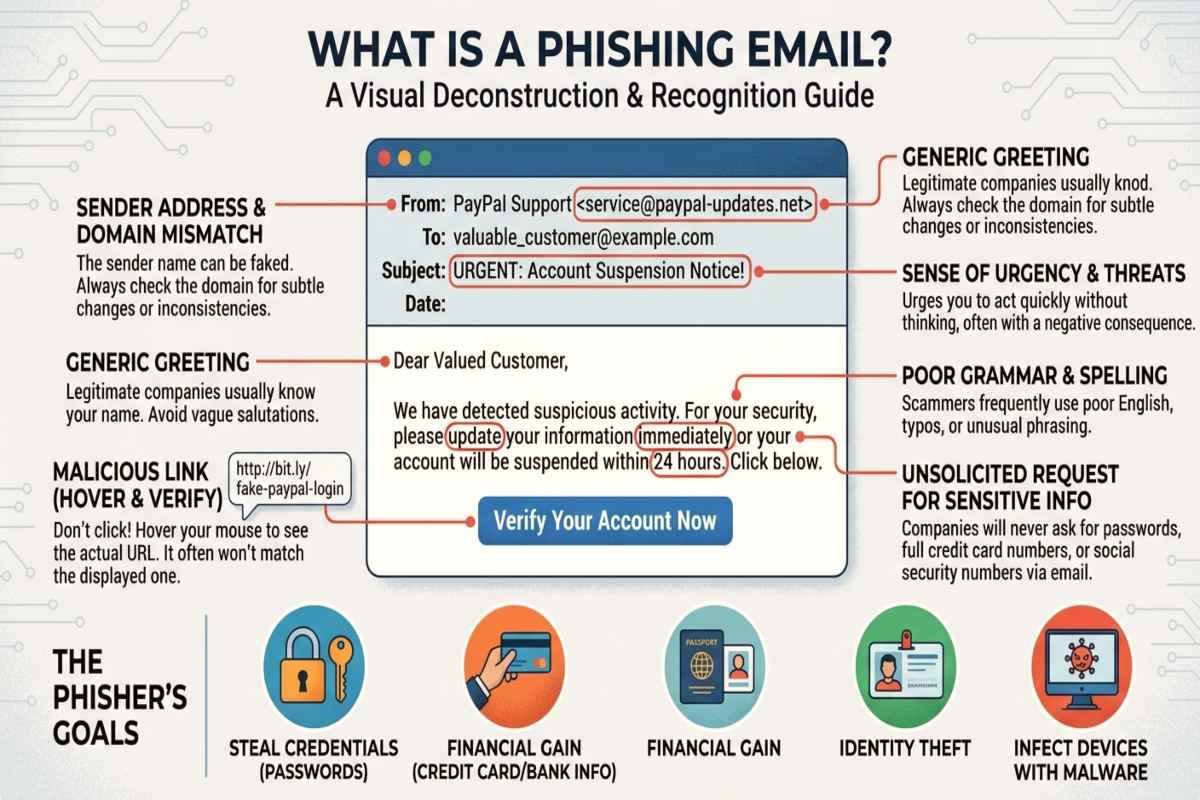
A phishing email is a dishonest message designed to trick recipients into revealing sensitive information, clicking malicious links, downloading harmful attachments, or providing unauthorized access to their accounts. Attackers frequently pretend to represent trusted organizations, including banks, government agencies, delivery companies, and technology providers. They may copy company logos, imitate familiar email formats, and create situations that encourage people to respond quickly.
For example, someone might receive an email claiming that their credit card payment has failed. The message provides a link to update billing information, but the website behind it may be controlled by criminals attempting to collect payment details. Phishing is a form of social engineering because it exploits human trust, emotions, and everyday habits. Its success often depends on convincing someone to take an action without checking whether the request is genuine.
What Does a Phishing Email Look Like? 7 Examples
Phishing emails do not always look suspicious at first glance. Some contain obvious mistakes, while others use professional language and familiar branding to appear trustworthy. Although techniques such as an XML Injection Attack target weaknesses in application input processing rather than email communication, understanding different cybersecurity threats helps readers recognize how attackers exploit trust and technical vulnerabilities.
1. Fake Bank Security Alert
Example:
Subject: Important Security Notice – Verify Your Bank Account
We detected unusual activity associated with your bank account. To protect your information, please verify your account details immediately. Failure to complete verification may result in temporary account restrictions.
The message creates fear by suggesting that someone has accessed your account. It then encourages you to follow an unfamiliar link and provide private information. Open your bank’s official website or mobile application independently. Never use an unexpected email link to verify your banking credentials.
2. Fake Package Delivery Notification
Example:
Subject: Delivery Attempt Unsuccessful
We were unable to deliver your package because additional information is required. Please confirm your delivery details to arrange another delivery attempt. Scammers take advantage of online shopping habits, while threats such as OS Command Injection exploit software vulnerabilities through unsafe input. A fake tracking page may request personal details or payment information. Check your shipment using the tracking number on the delivery company’s official website.
3. Fake Password Reset Request
Example:
Subject: Your Account Password Expires Today
Your account password is scheduled to expire. Confirm your current login information to avoid losing access to your account. The message tries to make recipients believe they must provide their passwords to maintain account access. Visit the service directly and review your account security settings.
4. Fake Invoice or Payment Request
Example:
Subject: Outstanding Invoice – Immediate Payment Required
Our records indicate that your latest invoice remains unpaid. Please review the attached document and complete your payment to avoid additional charges. The attachment could contain harmful content, or the payment instructions may direct money to a fraudulent account. Confirm unexpected invoices with the company using a previously verified contact method.
5. Fake Microsoft or Google Security Alert
Example:
Subject: Unusual Sign-In Activity Detected
We noticed a login attempt from an unfamiliar location. If this activity was not authorized by you, secure your account immediately. Attackers imitate familiar technology providers to make their messages appear trustworthy, while strong Source Code Security helps developers identify and fix software weaknesses that attackers may exploit. Visit the provider’s official website and review recent account activity.

6. Fake Job Offer
Example:
Subject: Congratulations! Your Application Has Been Selected
Your application has been shortlisted for our remote position. Please download the attached document and provide your personal information to continue. Fraudulent recruiters may use attractive job opportunities to collect identity information, request payments, or distribute malicious files. Research the employer and verify the vacancy through its official careers page.
7. Fake Subscription Payment Warning
Example:
Subject: Payment Failed – Update Your Billing Details
We could not process your subscription renewal. Please update your payment information within 24 hours to prevent service interruption. The message creates pressure by suggesting that you will lose access to a service unless you provide payment information. Check your subscription directly through the service’s official application or website.
Note: These examples are fictional and provided for educational purposes. They are not genuine communications from the organizations mentioned.
10 Warning Signs of a Phishing Email
A suspicious email does not always contain spelling mistakes or poor formatting. Modern scammers can create convincing messages that look similar to legitimate business communications.
| Warning Sign | What It May Indicate |
|---|---|
| Unknown sender | An unfamiliar or impersonated email address |
| Misspelled domain | A fake website or sender identity |
| Urgent language | Pressure to act without verification |
| Suspicious links | A destination unrelated to the claimed organization |
| Unexpected attachments | Potentially harmful downloaded files |
| Password requests | Attempts to steal login credentials |
| Unusual payment demands | Possible financial fraud |
| Generic greetings | A message sent without personal verification |
| Unexpected rewards | Attempts to collect personal information |
| Unusual account alerts | An attempt to create fear or confusion |
One important detail is that professional writing does not prove an email is genuine. Attackers can use artificial intelligence to improve grammar, personalize messages, and imitate familiar communication styles.
How to Identify a Phishing Email Before Clicking
You do not need advanced technical knowledge to recognize many phishing attempts. A few simple checks can help you make safer decisions. Do not trust the display name alone. On a desktop computer, hover over a link to preview its destination. If the URL does not match the organization mentioned in the message, avoid opening it.
We could not process your subscription renewal. Please update your payment information within 24 hours to prevent service interruption. The message creates pressure by suggesting that you will lose access to a service unless you provide payment information. While a Data Injection Attack targets weaknesses in how applications handle untrusted input, phishing scams use similar deception to exploit user trust. Check your subscription directly through the service’s official application or website.
How to Protect Yourself From Phishing Emails
Good email security starts with everyday habits. You cannot prevent every suspicious message from reaching your inbox, but you can make it more difficult for attackers to compromise your accounts.
- Enable Multi-Factor Authentication (MFA): Add another verification step to important accounts.
- Use Unique Passwords: Avoid reusing the exact password across banking, email, and social media accounts.
- Keep Devices Updated: Install security updates for your operating system, browser, and applications.
- Use Email Security Filters: Spam and phishing filters can help identify suspicious messages.
- Avoid Unexpected Attachments: Verify the sender before opening unfamiliar files.
- Use a Password Manager: A reputable password manager can help you avoid entering credentials on incorrect websites.
- Learn Email Security Practices: Individuals and employees should understand impersonation, suspicious requests, and social engineering.
Businesses can also implement SPF, DKIM, and DMARC to help authenticate email and reduce domain spoofing.
What Should You Do If You Receive a Phishing Email?
Receiving a suspicious message does not automatically mean your account has been compromised. The same attention to detail used in Supply Chain Planning can help organizations assess risks and maintain reliable processes. Still, the important thing is to avoid interacting with suspicious emails or clicking unknown links.
- Do not click suspicious links or download unexpected attachments.
- Avoid replying or sharing personal information.
- Use your email provider’s phishing-reporting option.
- Verify important requests through an official communication channel.
- Delete the message after reporting it, following your organization’s security procedures.
Gmail users can use the built-in Report phishing option to report suspicious messages.
What If You Already Clicked a Phishing Link?
Accidentally clicking a suspicious link can be worrying, but it does not automatically mean your information has been stolen. What matters is what happened afterward. If you entered your password, change it immediately through the legitimate website. If you reused that password elsewhere, update those accounts as well.
If you share banking or credit card information, contact your financial institution using its official phone number. If you downloaded a suspicious file, avoid opening it and run an updated security scan. People in the United States who share sensitive identity information can visit IdentityTheft.gov for recovery guidance.
Conclusion
Phishing emails can look like ordinary bank alerts, delivery updates, job offers, or payment reminders. Their biggest danger is that they make suspicious requests appear familiar and trustworthy. The best way to protect yourself is to pause before clicking, verify unexpected messages independently, and secure important accounts with strong passwords and multi-factor authentication.
Learning to recognize phishing attempts is a practical step toward protecting your personal information and building safer online habits. Explore more cybersecurity guides at AI Security Master to understand digital threats and make informed security decisions.
Frequently Asked Questions (FAQs)
What Happens If You Open a Phishing Email?
Simply opening a phishing email does not usually mean your device or account has been hacked. However, some emails may contain tracking elements that reveal whether a message was opened. The bigger risks come from clicking suspicious links, downloading malicious attachments, or sharing personal information.
What Happens If You Open a Phishing Email Twice?
Opening the same phishing email more than once does not automatically compromise your device. However, repeated interactions with suspicious links or attachments can increase your exposure to malicious websites, tracking, and malware. Avoid interacting with the message and report it through your email provider.
How Do You Know If You Have a Phishing Email?
You can identify a potential phishing email by checking for unfamiliar sender addresses, suspicious links, unexpected attachments, urgent requests, and messages asking for passwords or financial information. Always verify unexpected requests through the organization’s official website or contact details before taking action.
What Is the Biggest Red Flag for a Phishing Email?
One of the biggest red flags is an unexpected message that pressures you to click a link, provide sensitive information, or make a payment immediately. Scammers often create urgency to prevent people from checking whether the sender and request are legitimate.
Can someone hack my account just by opening an email?
Simply opening an email does not usually compromise an account. However, clicking malicious links, downloading harmful attachments, or entering login credentials can expose you to security risks.