Remote File Inclusion (RFI) is a web application vulnerability that occurs when an application allows untrusted input to determine which external file it loads. If an application does not properly restrict these references, attackers may be able to load malicious content, expose sensitive information, or execute code under certain server configurations.
Understanding Remote File Inclusion helps website owners, developers, and cybersecurity professionals identify insecure file loading practices and implement effective protection. This guide explains how RFI attacks work, their potential impact, and practical methods for detecting and preventing them.
What Is Remote File Inclusion (RFI)?
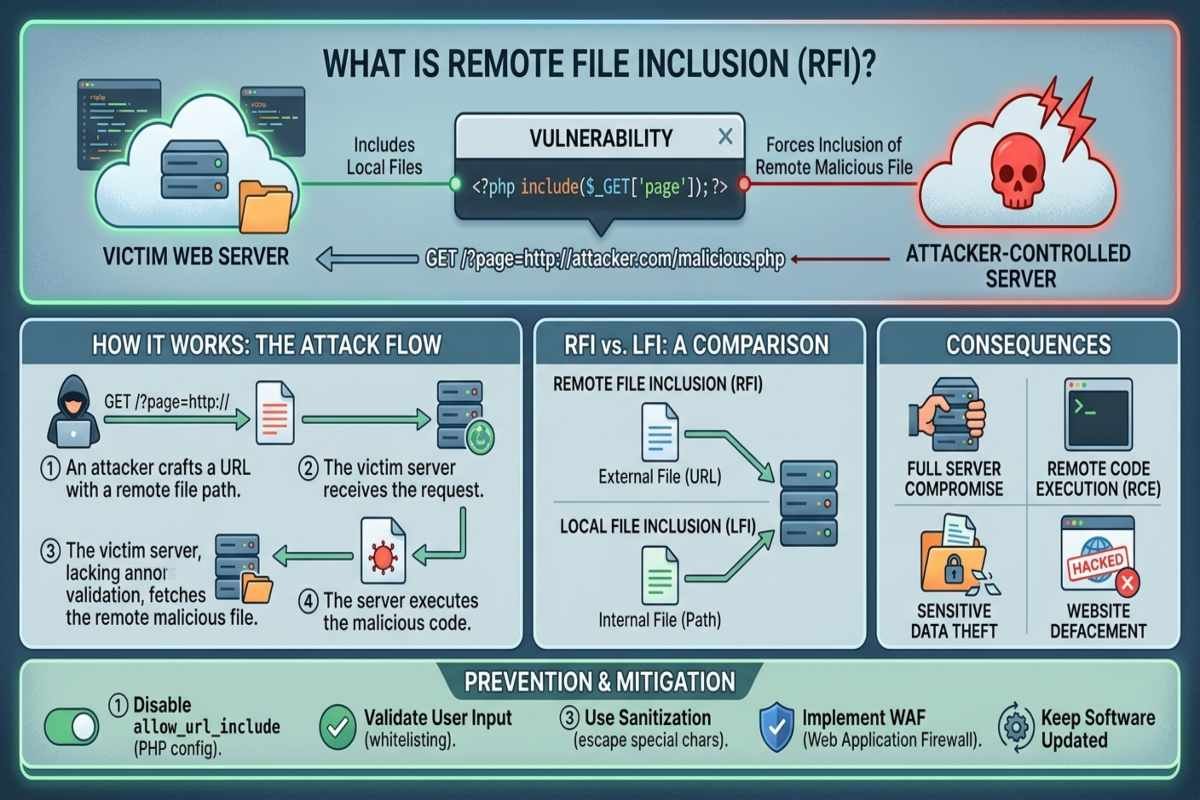
Remote File Inclusion is a security weakness that allows an attacker to manipulate a vulnerable application into including a file hosted on an external server. It has historically been associated with PHP applications that use dynamic file inclusion functions without sufficient validation or security restrictions.
For example, a website might use a request parameter to decide which page to display. If the application accepts arbitrary external URLs instead of selecting from approved local files, an attacker may attempt to supply a malicious resource. Successful exploitation depends on the application code, runtime configuration, and server permissions. RFI is different from ordinary external file loading because the vulnerability occurs when an application fails to enforce appropriate restrictions on the resources it includes.
How Does a Remote File Inclusion Attack Work?
An RFI attack typically involves manipulating an application input that controls a file reference. The application processes the supplied value and may attempt to include an external resource if the underlying code and configuration permit it.
- Input Manipulation: An attacker identifies an application parameter that influences file selection.
- Insufficient Validation: The application accepts a resource reference that should have been rejected.
- External Resource Inclusion: The vulnerable application attempts to load content from an attacker-controlled or otherwise untrusted location.
- Potential Exploitation: Depending on the environment, the attack may lead to code execution, information disclosure, or application disruption.
Developers should understand that accepting a URL does not automatically create an RFI vulnerability. The critical issue is whether untrusted input reaches a dangerous inclusion mechanism and whether the application can interpret the retrieved content unsafely, creating risks similar to an Agentic AI Attack when autonomous systems interact with untrusted external resources.
What Causes Remote File Inclusion Vulnerabilities?
Several coding and configuration mistakes can introduce RFI vulnerabilities into web applications.
- Unvalidated Input: Applications accept arbitrary file references from query parameters, forms, or API requests.
- Unsafe File Inclusion: Developers pass user-controlled values directly into dynamic inclusion functions.
- Insecure Configuration: Remote resource inclusion remains enabled when the application does not require it.
- Missing Allowlists: Applications lack a predefined list of permitted files or resources.
- Insufficient Security Testing: Code reviews and application tests fail to identify unsafe file loading behavior.
These weaknesses can become more difficult to manage when applications rely on third party libraries or external services. Effective Supply Chain Planning should therefore account for software dependencies, security reviews, update procedures, and the potential consequences of compromised components.
What Are the Security Risks of Remote File Inclusion?
The impact of an RFI vulnerability depends on the application’s permissions, runtime configuration, and the content being included. A successful attack may affect the confidentiality, integrity, or availability of a website.
| Security Risk | Potential Impact |
|---|---|
| Remote Code Execution | Malicious code may execute in a vulnerable application environment. |
| Sensitive Data Exposure | Confidential application information may be disclosed. |
| Website Compromise | Attackers may manipulate application behavior or website content. |
| Malware Introduction | Malicious content may enter an application workflow. |
| Service Disruption | Applications may become unstable or unavailable. |
Security teams can use AI Threat Intelligence to understand emerging attack techniques and prioritize relevant defensive measures. However, intelligence feeds should support technical investigation and risk assessment rather than replace direct evidence from application testing and monitoring.

Remote File Inclusion vs. Local File Inclusion
Remote File Inclusion (RFI) and Local File Inclusion (LFI) are related vulnerabilities, but they involve different file sources.
| Feature | Remote File Inclusion | Local File Inclusion |
|---|---|---|
| File source | External resource | File on the local system |
| Common weakness | Unsafe remote resource inclusion | Unsafe local file path selection |
| Potential consequences | Code execution or information disclosure | Information disclosure and, in some cases, code execution |
| Main defense | Restrict remote inclusion and use approved resources | Restrict file paths and use fixed resource mappings |
Both vulnerabilities can result from unsafe dynamic file selection. Developers should focus on eliminating the underlying weakness rather than relying exclusively on filters that attempt to block suspicious strings.
How to Prevent Remote File Inclusion Attacks
Preventing RFI requires secure application design, appropriate configuration, and ongoing security testing. Following OWASP LLM Security Risks guidance and applying secure coding practices can help reduce the likelihood and impact of file inclusion vulnerabilities.
Disable Unnecessary Remote Inclusion Features
Review the application’s runtime configuration and disable remote file inclusion capabilities that are not required. In PHP environments, administrators should specifically review relevant URL-aware file inclusion settings and test configuration changes before deploying them.
Use Fixed File Mappings
Avoid passing user-supplied URLs or file paths directly to inclusion functions. Instead, map permitted user choices to predefined resources stored within the application. For example, a documentation website can allow users to select from approved help pages without allowing the request to determine an arbitrary external location.
Validate Input with Allowlists
Apply server-side input validation to ensure that each input matches an expected value and follows secure coding practices. Allowlisting is generally more reliable than attempting to identify every possible malicious string, helping reduce risks associated with Spear Phishing, malicious file uploads, and other cyber threats. Validation should complement secure file selection logic. Even apparently valid input can become dangerous when it reaches an unsafe function or is interpreted in an unexpected context.
Apply Least Privilege Permissions
Run application processes with only the permissions they need. Restrict access to sensitive files, credentials, administrative interfaces, and critical system resources. Least privilege access limits the potential damage if an attacker successfully exploits an application weakness.
Update Software and Dependencies
Keep programming languages, frameworks, plugins, and third party libraries updated. Review dependency security before introducing new components and establish a process for investigating reported vulnerabilities. Applications that integrate AI services should also evaluate AI Agent Security because agents with access to tools, external resources, or privileged application functions can introduce additional security concerns. These risks are distinct from RFI but may require complementary controls.
Monitor Application Activity
Monitor server logs for unusual file references, repeated validation failures, unexpected outbound connections, and unexplained application changes. AI Threat Detection systems may help identify suspicious patterns across large volumes of security events. However, automated alerts should be investigated by security personnel, and monitoring should complement secure coding rather than act as the primary defense.
How Can Developers Detect RFI Vulnerabilities?
Developers should combine code reviews, configuration assessments, and authorized security testing to identify unsafe file inclusion behavior. Use this practical Cybersecurity Checklist.
- Review code for dynamic file inclusion functions and trace their input sources.
- Confirm that user input cannot select arbitrary external resources.
- Check runtime settings for unnecessary remote inclusion capabilities.
- Test whether unexpected resource references are rejected safely.
- Review application permissions and outbound network restrictions.
- Investigate suspicious file loading activity in application logs.
- Retest the application after remediation and document the results.
For more practical security guidance, AiSecMaster can connect readers with related resources on source code security, malicious code, web application protection, and AI security threats.

Frequently Asked Questions (FAQs)
What does RFI stand for in cybersecurity?
RFI stands for Remote File Inclusion. It describes a vulnerability in which an application can be manipulated into including an external file because resource selection is not properly restricted.
Is Remote File Inclusion a serious vulnerability?
Yes. Depending on the application and server configuration, RFI can lead to remote code execution, sensitive information exposure, website compromise, or service disruption.
What is the difference between RFI and LFI?
RFI involves including a resource from an external location, whereas LFI involves including a file from the local system. Both can result from insecure dynamic file selection.
Can a web application firewall prevent RFI attacks?
A web application firewall can help detect or block suspicious requests, but it should not be the only defense. Secure file mappings, appropriate configuration, input validation, and least privilege permissions are essential.
How can I check whether my website is vulnerable to RFI?
Review dynamic file inclusion code, inspect relevant runtime settings, and conduct authorized security testing. Verify that arbitrary external resources cannot be included and retest after fixing identified weaknesses.
Conclusion
Remote File Inclusion is a web application security vulnerability that can expose websites to code execution, data disclosure, and service disruption when external file references are not properly controlled. Developers can reduce these risks through fixed file mappings, strict input validation, secure configuration, least privilege permissions, and regular security testing.
Understanding RFI alongside broader cybersecurity practices helps organizations build safer applications and protect sensitive information. Review your application’s file loading logic, address unsafe configurations, and include these checks in your ongoing security assessments.