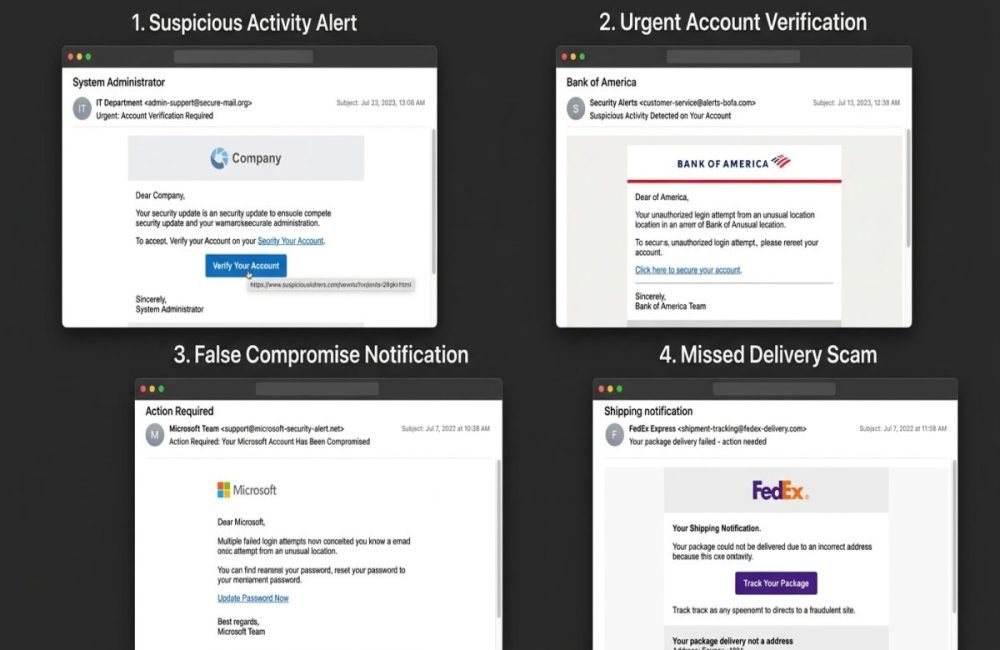

Spear phishing is a targeted cyberattack in which an attacker creates a personalized message to deceive a specific person, employee, executive, or organization. The goal may be to steal credentials, obtain sensitive information, deliver malware, commit fraud, or gain unauthorized access to a system.
Unlike ordinary phishing, which often sends generic messages to large numbers of people, spear phishing is designed around a particular target. Attackers may use names, job titles, company information, business relationships, or other available details to make a fraudulent message look legitimate. For businesses and individuals in the USA, understanding what spear phishing in cybersecurity is is important because a single successful interaction can become the starting point for account compromise, financial loss, data exposure, or a larger security incident.
What Is Spear Phishing in Cyber Security?
Spear phishing is a form of social engineering where attackers use customized communication to persuade a particular target to perform an action. A spear phishing message could mention the recipient by name, reference their company, identify their department, and discuss a real project. This additional context can make the fraudulent request appear more believable.
Attackers may gather information from public websites, professional profiles, social media, exposed data, or previous communications. The information does not have to be secret to be useful. Even basic details can help an attacker construct a convincing story.
How Does Spear Phishing Work?
A successful spear phishing campaign often involves several stages.
Target Selection
The attacker identifies a person or organization that may provide valuable access.
- Finance employees
- IT administrators
- Executives
- Human resources staff
- Business owners
- Employees with customer data access
- Employees responsible for payments
The attacker may choose a target because of the information or permissions available through that person’s account.
Information Gathering
Next, the attacker collects information about the target.
- Name and job title
- Company name
- Department
- Business relationships
- Current projects
- Public contact information
- Organizational structure
This stage helps the attacker make the communication appear familiar.
Creating the Message
The attacker creates a message designed around the target.
- A manager
- CEO
- Coworker
- Supplier
- Customer
- IT department
- Financial institution
The message may also contain a malicious link or attachment.
Creating Urgency
Attackers often attempt to reduce the time available for careful thinking.
- An account will be disabled.
- A payment is overdue.
- A document needs immediate approval.
- A password must be reset.
- A confidential request requires immediate attention.
The objective is to encourage the recipient to react instead of verify.
Triggering the Action
The victim may then be asked to act.:
- Click a link.
- Enter credentials.
- Open a document.
- Send sensitive information.
- Approve an authentication request.
- Transfer money.
Exploiting the Result
If the victim follows the instructions, the attacker may gain credentials, information, access, or an opportunity to continue the attack. Microsoft describes spear phishing as highly targeted and customized phishing that can be used to obtain credentials, deliver malware, or establish access to an environment.
Phishing
Traditional phishing commonly attempts to reach many people with similar messages.
Spear Phishing
Spear phishing narrows the target and customizes the communication.
Whaling
Whaling is generally used for targeted phishing aimed at high-profile individuals such as executives or senior decision makers. The important distinction is that spear phishing is defined primarily by its targeted and personalized nature, not simply by the communication channel.
Common Spear Phishing Examples
Fake Executive Request
An employee receives an email that appears to come from the company’s CEO. The message requests an urgent payment or confidential document. The attacker relies on authority and urgency to persuade the employee.
Vendor Impersonation
A criminal impersonates a supplier and asks a finance employee to change payment information. Because changing vendor information can occur during legitimate business operations, the fraudulent request may initially appear normal.
Fake Login Page
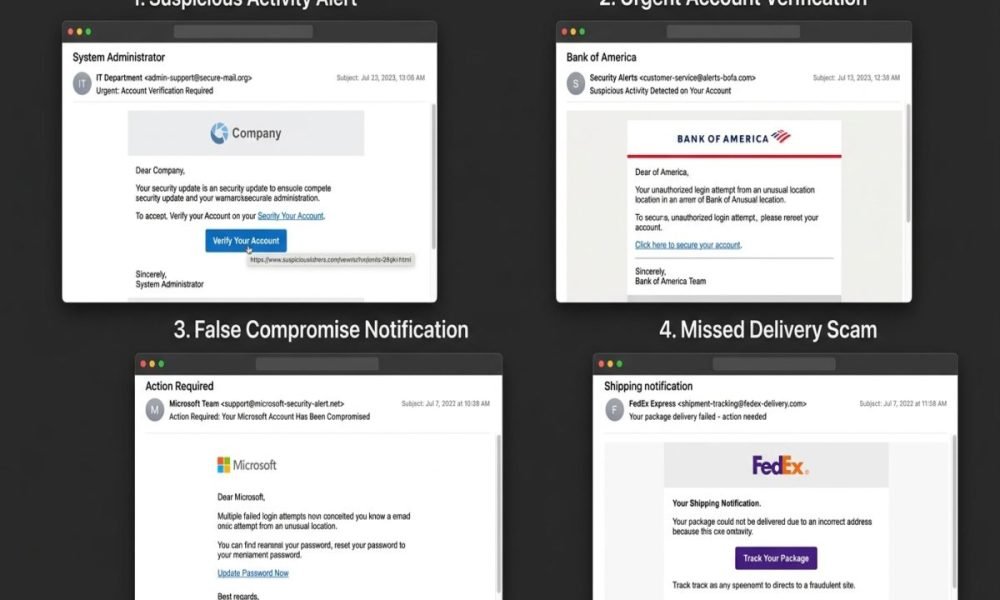
An employee receives a personalized account verification message. The included link leads to a fake login page designed to capture the employee’s credentials.
Malicious Attachment
A message may contain an attachment presented as an invoice, report, résumé, or business document. Opening an unexpected attachment can expose the user or device to malicious activity.
Compromised Business Account
An attacker who has already compromised one account may use it to send convincing messages to other employees or business contacts. This can make detection more difficult because the communication appears to originate from a legitimate account.
How to Detect Spear Phishing
Effective phishing detection requires more than checking whether an email looks professional. Attackers can create messages that appear polished, relevant, and familiar. Look for multiple warning signs together.
Check the Sender
Look carefully at the complete sender address. An attacker may use a domain that resembles a legitimate organization but contains a subtle spelling difference.
Examine Links
Before opening an unexpected link, verify its destination. A familiar-looking message does not guarantee that its link is legitimate.
Question Urgent Requests
Unexpected urgency should increase your level of scrutiny. Be especially careful when a message requests money, credentials, sensitive information, or an unusual administrative action.
Watch for Unexpected Attachments
Do not automatically open an attachment simply because it appears to come from someone you know. If the document was not expected, verify it first.
Verify Sensitive Requests
If an email asks for a financial transfer, password reset, sensitive file, or account change, verify the request using an independent trusted channel. For example, call the person using a known number instead of replying directly to a suspicious email.
Why Is Spear Phishing Dangerous?
Spear phishing is dangerous because it combines technical deception with human trust. A technically secure organization can still face risk if an employee is convinced to provide credentials or approve an unauthorized action.
- Credential theft
- Account takeover
- Financial fraud
- Malware infection
- Data exposure
- Unauthorized access
- Business email compromise
- Operational disruption
The impact depends on the permissions available to the compromised account and what the attacker does afterward. This is why organizations should not treat phishing as simply an email problem. It can become an identity, access control, data protection, and incident response problem.

How to Prevent Spear Phishing
There is no single control that can eliminate every targeted phishing attack. Organizations should instead build multiple layers of protection.
Use Multi Factor Authentication
MFA provides an additional authentication layer beyond passwords. If a password is stolen, MFA can make unauthorized account access more difficult, depending on the authentication method and attack scenario. Important accounts should receive strong authentication protection, particularly administrator, finance, executive, and security accounts.
Apply Least Privilege
Users should receive only the permissions required for their responsibilities. If an employee account is compromised, unnecessary permissions can increase the potential impact. This principle is also important when designing security for system environments because access should be based on business requirements rather than convenience.
Train Employees
- Suspicious sender addresses
- Unexpected links
- Dangerous attachments
- Social engineering
- Payment fraud
- Credential requests
- Reporting procedures
Training should use realistic examples so employees learn how to handle actual workplace situations.
Strengthen Email Security
Organizations should deploy appropriate email security controls to inspect messages, links, sender information, and suspicious attachments. Email security should be treated as one layer rather than the entire defense strategy.
Protect High Value Accounts
Executives, finance employees, IT administrators, and other privileged users may require additional controls because compromise can have a greater organizational impact.
Monitor Account Activity
Security teams should monitor unusual authentication and account behavior. Potential warning signs include unusual login locations, unexpected password changes, suspicious forwarding rules, privilege changes, or unusual data access.
What Should You Do After Clicking a Spear Phishing Link?
Clicking a suspicious link does not automatically prove that your device or account has been compromised, but it should be treated seriously.
Step 1: Stop
Do not continue interacting with the suspicious website. Do not enter additional information.
Step 2: Report It
Contact your organization’s IT or security team and provide the original message if possible.
Step 3: Change Exposed Credentials
If you entered a password on a suspicious website, change it through the legitimate service. If that password was reused elsewhere, change those accounts as well.
Step 4: Review Account Activity
Look for unfamiliar logins, account changes, messages, or transactions.
Step 5: Follow Incident Response Procedures
Organizations should follow their established process for investigating and containing suspected phishing incidents. Preserve the original message, URL, time of interaction, and other relevant information because these details can help security teams investigate.
Spear Phishing and AI Security
Artificial intelligence is changing the broader threat landscape, including social engineering. Generative AI can help create more polished and personalized messages. This means users should not assume that a message is safe simply because it contains correct grammar or professional language.
At the same time, spear phishing should not be confused with AI-specific attacks. For example, OWASP LLM security risks cover security risks associated with large language model applications, including areas such as prompt injection and sensitive information disclosure. These risks are related to AI applications rather than being types of spear phishing.
AI Privacy and Data Protection
AI systems can process large quantities of information, making privacy and access controls important considerations. AI privacy involves protecting personal and sensitive information when AI systems collect, process, store, or generate data.
These concepts are different from spear phishing, but they can intersect when an attacker uses phishing to obtain credentials that provide access to AI platforms, internal datasets, cloud applications, or business systems. Organizations should therefore consider identity security and phishing resistance when protecting AI environments. Similarly, AI data protection focuses on controlling and protecting information used by AI applications and workflows.
Can Security Scanners Prevent Spear Phishing?
Security scanners can support a broader cybersecurity program, but they should not be treated as a complete spear phishing solution. Different security tools can inspect websites, email content, files, endpoints, applications, or infrastructure for suspicious indicators. However, a highly targeted social engineering message may exploit legitimate communication channels or rely primarily on human decision-making.
- MFA
- Email security
- Identity controls
- Employee training
- Least privilege
- Monitoring
- Incident response
- Independent verification
Security is strongest when technical controls and human processes work together.
Spear Phishing Cybersecurity Checklist
Use this cybersecurity checklist when reviewing an unexpected message:
- Verify the complete sender address.
- Check unexpected links before opening them.
- Treat unexpected attachments cautiously.
- Question urgent requests.
- Verify financial requests independently.
- Never share passwords through email.
- Protect important accounts with MFA.
- Limit unnecessary privileges.
- Report suspicious messages quickly.
- Review account activity after suspected compromise.
- Preserve evidence for security teams.
- Follow organizational incident response procedures.
The goal is not to make employees suspicious of every email. The goal is to make them careful when a message requests something sensitive or unusual.

Conclusion
Understanding what spear phishing in cybersecurity is starts with recognizing that these attacks are built around trust and personalization. Attackers may research a target, create a convincing message, establish urgency, and attempt to persuade the victim to reveal information or perform an unauthorized action. The most effective defense is layered. Use MFA, verify sensitive requests independently, protect privileged accounts, apply least privilege, strengthen email security, train employees, and monitor suspicious activity.
Frequently Asked Questions (FAQs)
What is spear phishing in cybersecurity?
Spear phishing is a targeted form of phishing in which an attacker creates personalized communication for a specific person or organization. The objective may be credential theft, fraud, malware delivery, sensitive data theft, or unauthorized access.
What is the difference between phishing and spear phishing?
Phishing can target a large audience with relatively generic messages. Spear phishing focuses on a specific target and uses personalized information to make the communication more convincing.
What is an example of spear phishing?
An example is an attacker impersonating a company executive and sending a personalized request to an employee for a financial transfer or confidential information.
Can spear phishing happen outside email?
Yes. Targeted phishing can use other communication channels, including messaging platforms and other digital communications. The defining characteristic is the targeted nature of the deception rather than the specific channel.
How can businesses prevent spear phishing?
Businesses should combine employee awareness, MFA, email security, least privilege, sensitive request verification, monitoring, and clear incident reporting procedures.