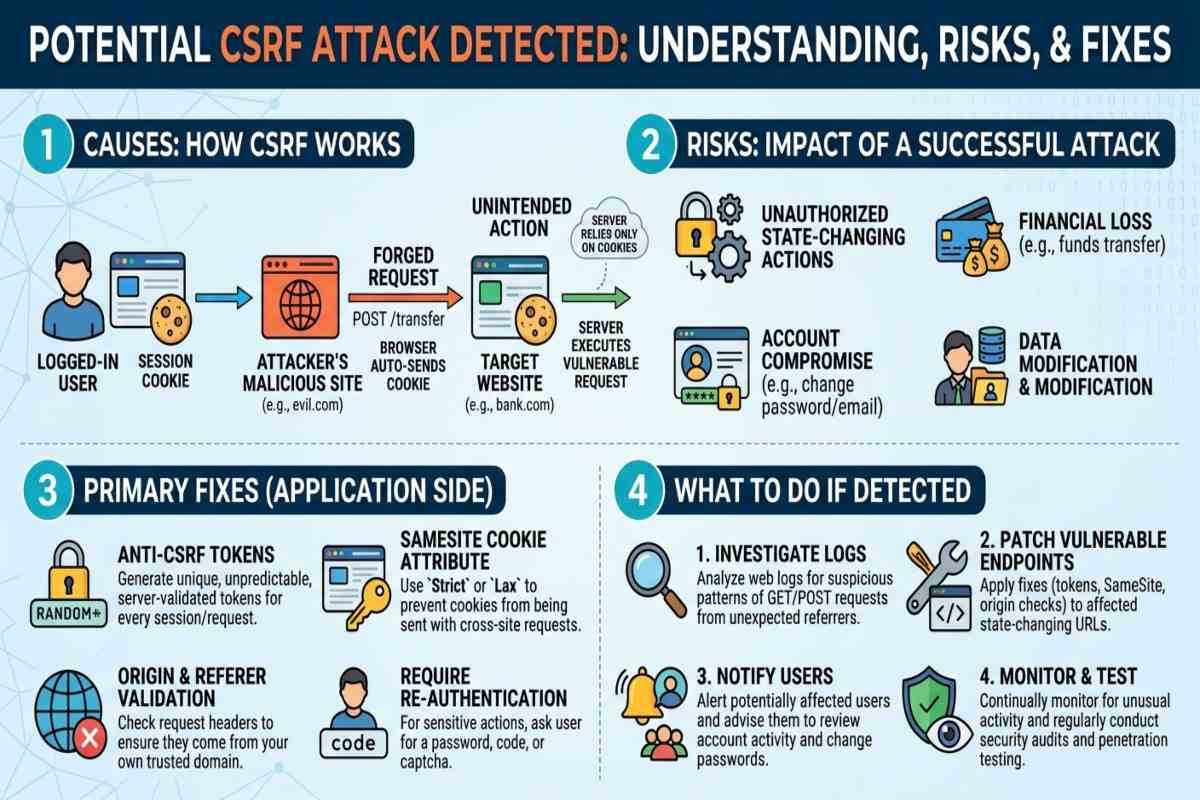
A potential CSRF attack detected warning means a website, browser, security system, or web application may have identified a request that appears to violate its cross site request protection rules. Cross-Site Request Forgery (CSRF) occurs when an attacker tricks an authenticated user’s browser into performing an unwanted action on a trusted website.
The right fix depends on the cause. Developers should investigate request validation, CSRF tokens, cookie settings, and the Origin or Referer headers before deciding whether a request is malicious or a legitimate request that has been incorrectly blocked.
At a Glance
- What is CSRF: An attack that abuses a user’s authenticated browser session.
- Common Causes: Missing or invalid CSRF tokens, insecure cookie settings, and inadequate Request Validation.
- Main Risks: Unauthorized account changes, fraudulent transactions, and administrative actions.
- Best Fixes: Use validated CSRF tokens, configure SameSite cookies, validate request origins, and avoid state-changing GET requests.
- Who is Affected: Website owners, developers, administrators, and users of vulnerable web applications.
What Does “Potential CSRF Attack Detected” Mean?
A potential CSRF attack detected message indicates that a request may have failed a security check designed to prevent unauthorized cross-site actions. The warning does not automatically prove that an attacker is present. Expired tokens, stale browser tabs, session changes, or incorrectly configured security controls can also trigger it.
CSRF typically targets applications that rely on automatically attached browser credentials, such as session cookies. An attacker attempts to make a victim’s browser send a request to a trusted application while the victim is logged in. For example, if an online banking application fails to validate a sensitive transaction request, a malicious website might attempt to trigger an unauthorized action through the victim’s existing session. Proper server-side validation should prevent the transaction from being accepted.
How Does a CSRF Attack Work?
A CSRF attack exploits the difference between a browser sending valid credentials and a server verifying that the user intentionally initiated an action.
- 1. User logs in
- 2. Attacker creates a malicious request
- 3. Browser sends the request
- 4. Server validates or rejects it
A crucial distinction is that CSRF is not the same as stealing a password or session cookie. In some attacks, Spear Phishing may trick a targeted user into visiting a malicious website, allowing an attacker to attempt unauthorized actions through the victim’s authenticated browser session.
What Causes a Potential CSRF Attack Detected Warning?
Several technical problems can trigger a CSRF warning. Identifying the underlying cause helps developers distinguish genuine attacks from normal application errors.
Missing or Invalid CSRF Tokens
CSRF tokens are unpredictable values associated with a user’s session or request context. Applications include them in sensitive requests and verify them on the server.
A warning may appear when a token is missing, expired, incorrect, or associated with a previous session. Developers should check token generation, form submissions, asynchronous requests, and session renewal.
Incorrect Cookie Configuration
Session cookies determine how browsers send authentication information. Inadequate cookie settings can increase exposure to cross-site requests, making secure cookie configuration essential for website protection. AiSecMaster helps readers understand cybersecurity risks and practical security measures, including session management, CSRF prevention, and protecting sensitive user data.
The SameSite attribute helps control when cookies accompany cross-site requests. SameSite=Lax or SameSite=Strict can reduce CSRF exposure, but neither should automatically replace appropriate request validation for sensitive operations.
Missing Origin or Referer Validation
Web applications can inspect the Origin header and, where appropriate, the Referer header to determine where a request originated. Unexpected or invalid origins may indicate a suspicious request.
However, header checks must be implemented carefully. Proxies, privacy settings, and legitimate application flows can affect header availability. Missing headers should be handled according to an explicit security policy rather than automatically treated as proof of an attack.
Expired Sessions and Browser Issues
A legitimate request may fail because a session expires while a form remains open, a user signs in again in another tab, or a page submits an outdated token. Browser extensions and application caching can also contribute to unusual behavior. In business applications, Supply Chain Planning systems may encounter similar request-validation issues when users manage inventory, update orders, or coordinate supplier workflows, making reliable session management and secure request validation essential.
If users repeatedly encounter warnings during normal activity, developers should investigate the application’s session lifecycle and token handling instead of simply disabling CSRF protection.
What Are the Risks of a Successful CSRF Attack?
A successful CSRF attack can cause a website to perform actions under the victim’s authenticated account. The consequences depend on the user’s permissions and the application’s available functions.
| Risk | Potential Impact |
|---|---|
| Account Modification | Unauthorized changes to email addresses or account settings. |
| Financial Fraud | Unauthorized payments or transfers. |
| Administrative Abuse | Changes to users, permissions, or application settings. |
| Data Integrity Loss | Unwanted modifications to business records. |
| Business Disruption | Unauthorized actions that interrupt normal operations. |
CSRF can become more serious when an administrator’s account is targeted because administrative permissions may expose more sensitive functions. Organizations should prioritize protected endpoints based on their business impact, not simply the number of suspicious requests.
Can CSRF Lead to Other Cybersecurity Threats?
CSRF and phishing are different attack methods, but attackers may combine them in a broader campaign. Spear Phishing can persuade an employee to visit a malicious website or interact with a deceptive link, while CSRF attempts to misuse an existing authenticated session.
Reviewing Phishing Email Examples can help employees recognize suspicious messages, but user awareness alone cannot replace technical protections. Organizations should also investigate suspicious login activity, unexpected account changes, and unusual administrative requests.

How to Fix a Potential CSRF Attack Detected Warning
The following steps help developers and website administrators identify the cause and implement effective defenses.
Implement Server Validated CSRF Tokens
Generate unpredictable tokens using a secure method and validate them on the server for protected state-changing requests. Use your web framework’s established CSRF protection where available instead of creating a custom mechanism without a clear security need. Integrating AI Threat Intelligence can further help security teams identify suspicious request patterns and investigate potential attacks, while server-side token validation remains essential for preventing unauthorized actions.
Configure Secure Session Cookies
For session cookies, review the following attributes:
- Secure — sends the cookie only over HTTPS.
- HttpOnly — prevents ordinary JavaScript access to the cookie.
- SameSite — controls cookie transmission in cross-site contexts.
Select an appropriate SameSite policy for the application’s login and integration requirements. Remember that HttpOnly helps limit cookie theft through JavaScript but does not, by itself, prevent CSRF.
Validate Request Origins
For sensitive operations, verify the request’s origin against an explicitly configured trusted origin. Use Referer as a carefully implemented fallback when appropriate, and define how the application handles absent or invalid headers.
Keep State Changing Actions Out of GET Requests
HTTP GET requests should retrieve information, not change account settings, submit payments, or delete records. Strong Code Security requires using appropriate state-changing methods, such as POST, PUT, PATCH, or DELETE, alongside server-side authorization and CSRF defenses. Changing the HTTP method alone does not eliminate CSRF; every sensitive operation must still enforce the application’s security requirements.
Investigate Logs Before Disabling Security Controls
If warnings persist, review application logs and compare failed requests with normal activity. Examine token validation failures, session expiration, request origins, affected endpoints, and recent application changes. Do not log passwords, session cookies, or raw CSRF tokens. If an incident appears genuine, preserve relevant security logs, investigate unauthorized changes, and follow your incident response process.
CSRF Prevention Checklist for Website Owners
Use this checklist during development, maintenance, or a security review.
- Enable framework-supported CSRF protection.
- Validate tokens on every relevant state-changing request.
- Configure secure session cookies and HTTPS.
- Verify trusted request origins where appropriate.
- Keep GET requests free of state-changing operations.
- Apply server-side authentication and authorization.
- Test legitimate browser sessions, expired sessions, and suspicious requests.
- Monitor repeated validation failures and investigate unusual account activity.
For a broader security review, connect these controls to your organization’s application security testing and incident response procedures. On AiSecMaster, related guides on LLM Security and source code security can help readers explore additional application and AI security risks.
How CSRF Relates to AI Security
Traditional CSRF defenses remain important for websites that integrate AI features. An AI assistant embedded in an authenticated application may have access to account information or actions, so developers should distinguish between requests initiated by a user and actions initiated by an automated component.
AI Agent Security introduces additional concerns when autonomous agents can invoke tools, call APIs, or perform actions on a user’s behalf. An Agentic AI Attack may exploit weaknesses in tool permissions or workflows, while OWASP LLM Security Risks include issues such as prompt injection and excessive agency. These are distinct risks from traditional CSRF and require their own safeguards.

Conclusion
A potential CSRF attack detected warning deserves investigation, but it does not automatically indicate a successful attack. Developers should identify whether the request was malicious or legitimate, validate CSRF tokens on the server, configure secure cookies, and protect sensitive endpoints with layered controls. The practical takeaway is simple: investigate the warning, preserve security protections, and test the underlying request handling logic before making configuration changes.
Frequently Asked Questions (FAQs)
What is the full form of CSRF?
CSRF stands for Cross-Site Request Forgery. It is a web security vulnerability in which an attacker tricks a user's browser into submitting an unwanted request to a website where the user is authenticated.
Does a potential CSRF attack detected warning mean my account is hacked?
No. The warning indicates that a request may have failed a security check, not that an account has definitely been compromised. Check for unexpected account changes, suspicious activity, and repeated authentication failures before determining whether an incident occurred.
How can I fix a CSRF error as a website user?
Refresh the page, sign in again if your session has expired, and retry the action through the website's legitimate interface. If the warning continues, contact the website administrator. Avoid disabling browser security settings or repeatedly submitting sensitive transactions.
Are CSRF tokens enough to prevent every attack?
No. CSRF tokens are an important defense, but their effectiveness depends on secure generation, transmission, and server-side validation. Applications should also use appropriate cookie settings, origin checks, authorization controls, and protection against cross-site scripting (XSS).
How can developers test for CSRF vulnerabilities?
Developers can test sensitive endpoints in an authorized staging environment by submitting requests with missing, invalid, or expired tokens and examining whether the server rejects them.