
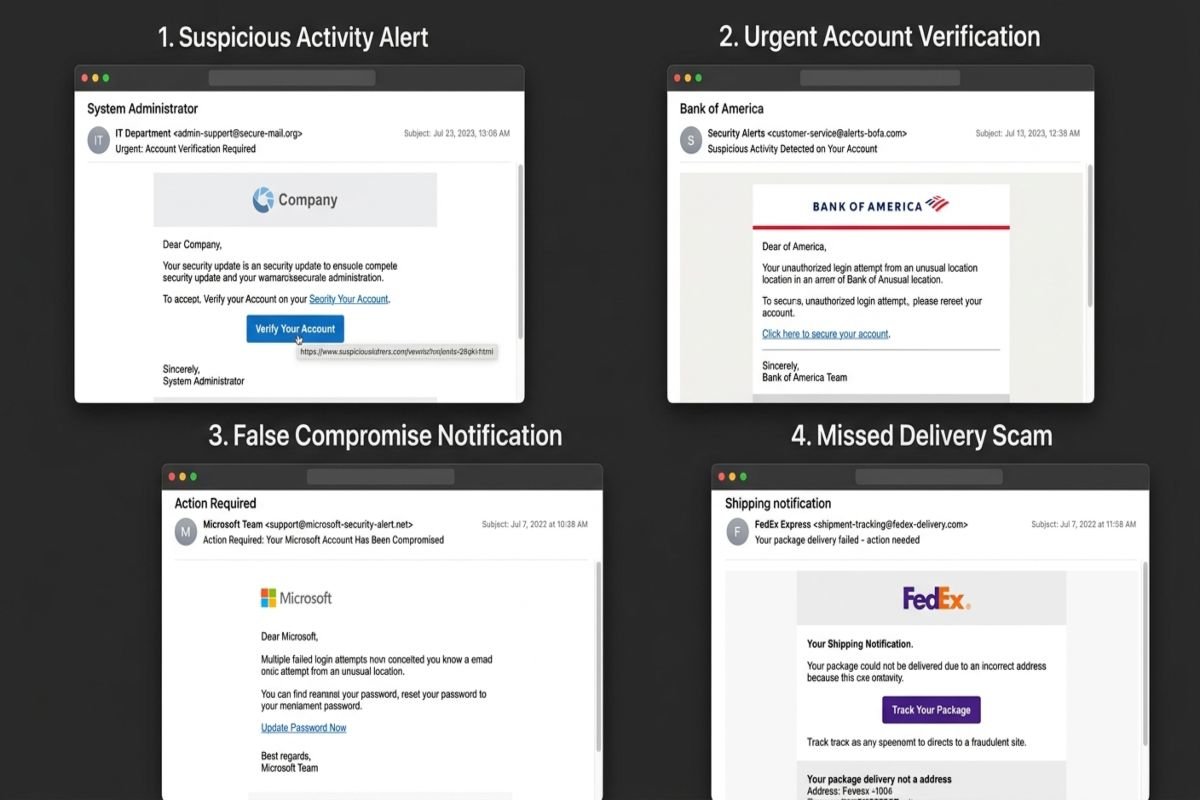
Phishing emails are deceptive messages designed to look legitimate while trying to make you reveal sensitive information, click a malicious link, open an unsafe attachment, or send money. Learning from realistic Phishing Email Examples can help you recognize suspicious messages before they become a security problem. This guide explains common phishing email patterns, the warning signs to look for, and what to do when a suspicious message reaches your inbox.
How to Spot a Phishing Email
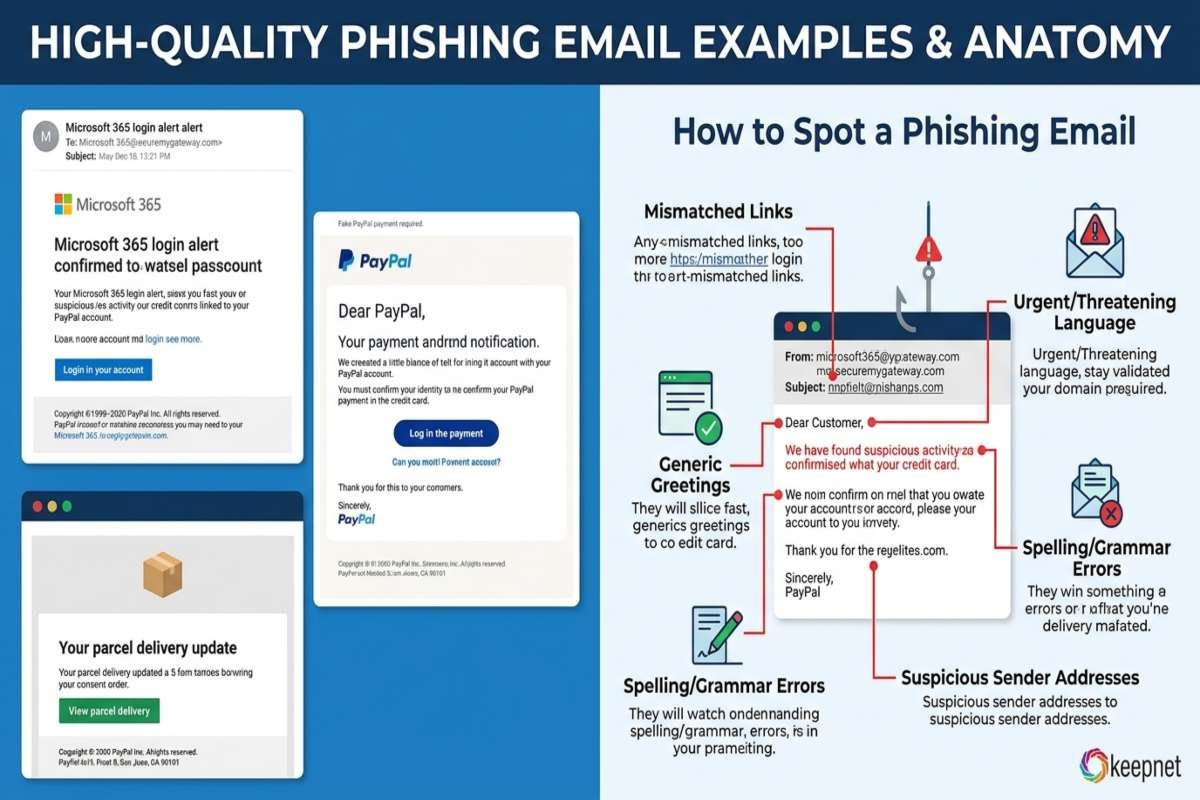
A phishing email often combines several warning signs rather than relying on one obvious mistake.
- An unexpected request for sensitive information
- Urgent or threatening language
- A suspicious sender address or domain
- Links that lead somewhere different from the displayed text
- Unexpected attachments
- Generic greetings
- Requests for passwords, payment information, or verification
- Spelling, grammar, branding, or formatting inconsistencies
Microsoft identifies suspicious links, unusual sender addresses, urgent requests, generic greetings, and requests for personal information among common phishing indicators.
What Is a Phishing Email?
A phishing email is a social engineering message that impersonates a trusted person, company, service, or organization. Its goal is usually to persuade the recipient to take an action that benefits the attacker, such as providing credentials or visiting a fraudulent website.
The message may appear to come from a bank, online retailer, employer, cloud service, delivery company, or even someone inside your organization. Attackers can imitate logos, writing styles, names, and legitimate-looking websites to make a message appear credible.
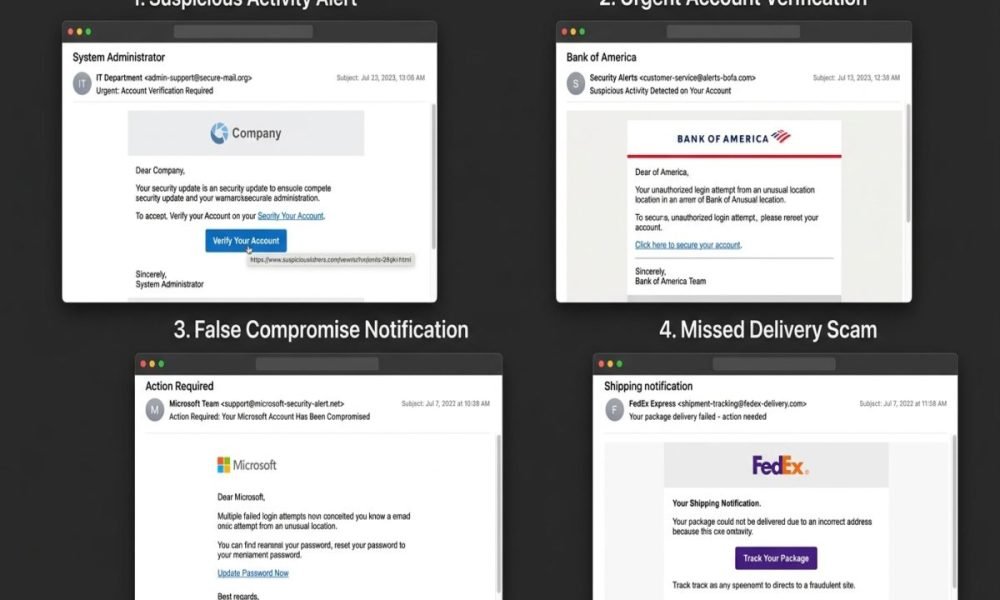
7 Phishing Email Examples You Should Know
The following examples are fictional training scenarios. They are intentionally simplified so you can learn the warning signs without reproducing a real malicious campaign.
1. Fake Bank Account Alert
Subject: Urgent: Your Bank Account Requires Verification
The email claims that unusual activity has been detected and says you must verify your account immediately.
Warning Signs:
- Creates fear about account security
- Demands immediate action
- Contains a login link
- May request banking credentials
This Security Master approach can help readers verify unexpected communications safely and reduce the risk of phishing attacks.
2. Fake Package Delivery Message
Subject: Delivery Problem: Update Your Address
The message claims that a package cannot be delivered until you confirm an address or pay a small delivery fee.
Warning Signs:
- You may not be expecting a package
- The message creates urgency
- A payment or personal information request follows
- The link may lead to a fake delivery website
This type of scam is particularly effective because people regularly receive legitimate delivery notifications. The important question is whether you actually have a package associated with the message.
3. Fake Microsoft or Cloud Account Warning
Subject: Your Account Will Be Suspended
The email claims that your Microsoft or cloud account will be disabled unless you sign in immediately.
Warning Signs:
- Threat of account suspension
- Login button or link
- Sender domain does not match the claimed organization
- Request for credentials
A familiar brand name does not automatically make an email legitimate. Microsoft specifically warns users to examine domains carefully because attackers may use subtle misspellings or unrelated domains.
4. Fake Password Reset Email
Subject: Password Reset Requested
The recipient receives an unexpected password reset message containing a button to “cancel” or “secure” the account.
Warning Signs:
- You did not request a password reset
- The link directs you to an unfamiliar domain
- The message asks you to enter your current password
- The sender address looks slightly unusual
This simple step, combined with AI Threat Detection , can help identify suspicious links and reduce the risk of phishing attacks.
5. Fake Invoice or Payment Request
Subject: Outstanding Invoice – Payment Required
The email appears to come from a supplier, business, or service provider and includes an invoice or payment request.
Warning Signs:
- Unexpected invoice
- Pressure to pay quickly
- New or unusual payment instructions
- Attachment you were not expecting
- Request to change bank details
For businesses, payment-related phishing deserves additional scrutiny because attackers may target employees who handle invoices, finance, or purchasing.
6. Fake Job or Payroll Email
Subject: Payroll Verification Required
The message claims that an employee must confirm payroll, tax, or direct deposit information.
Warning Signs:
- Request for financial information
- Unexpected payroll change
- Urgent deadline
- Sender address does not match the organization
- Link to an unfamiliar login page
If a message concerns payroll or employment information, verify it through your company’s normal HR or payroll channel.
7. Executive Impersonation Email
Subject: Need This Done Today
The email appears to come from a manager, executive, or business owner and asks an employee to purchase gift cards, transfer money, or provide confidential information.
Warning Signs:
- Authority-based request
- Strong pressure to act quickly
- Request to keep the transaction private
- Unusual payment method
- Sender address that looks similar but is not genuine
This is an example of social engineering the attacker attempts to influence behavior rather than relying only on technical exploitation.
How to Identify a Phishing Email Safely
Check the Sender Address
Do not rely only on the display name. Open the sender information and examine the actual email address. For example, an email displaying “Your Bank” could come from a completely unrelated domain. Attackers may also use look-alike domains with small spelling changes, a tactic that can become harder to detect as Agentic AI Attack techniques evolve.
Inspect Links Before Clicking
If a message contains a hyperlink, hover over it without clicking. Check whether the destination matches the organization that supposedly sent the message. A suspicious destination, unfamiliar domain, shortened URL, or unexpected website should be treated cautiously.
Watch for Urgency and Fear
Messages saying “act now,” “your account will be closed,” or “payment is overdue” are designed to reduce the time you spend evaluating the request. Microsoft recommends pausing when a message demands immediate action.
Be Careful With Attachments
Unexpected attachments can create AI Security risks, particularly when the message asks you to enable macros, install software, change security settings, or open an unfamiliar file.
Verify Through a Separate Channel
If an email appears to come from your bank, employer, colleague, or another trusted organization, verify it independently. Do not reply to the suspicious email and ask whether it is legitimate. Instead, use a known phone number, official website, previously established communication channel, or another trusted contact method.
Phishing Email Red Flags Checklist
| Red Flag | Why It Matters |
|---|---|
| Unexpected message | You may not have initiated the interaction |
| Urgent language | Pressure can discourage careful checking |
| Strange sender domain | The sender may not be who they claim |
| Suspicious link | It may lead to a fraudulent website |
| Unexpected attachment | Could contain malicious content |
| Generic greeting | May indicate mass targeting |
| Credential request | Attackers commonly seek account access |
| Payment request | Could lead to financial fraud |
| Spelling or formatting issues | May indicate an impersonation attempt |
| Unusual instructions | The request may be inconsistent with normal procedures |
What Should You Do If You Receive a Phishing Email?
First, do not click links, open unexpected attachments, reply, or provide sensitive information. If the message claims to represent an organization you use, independently visit its official website or contact it through a trusted channel. You should also report suspicious messages using your organization’s reporting process or your email provider’s phishing reporting function. In the United States, consumers can report scams to the Federal Trade Commission through its official reporting service.
If you already entered a password into a suspicious website, change that password through the legitimate service and review account activity. If financial information was exposed, contact the relevant financial institution using a trusted contact method.
How AI Is Changing Phishing Detection
AI is becoming relevant to both sides of the phishing problem. Security teams can use AI threat detection and automated analysis to identify suspicious messages, domains, links, and behavioral patterns. As generative AI and agentic systems become more integrated into business workflows, phishing can also become part of broader agentic AI attack scenarios. For example, a malicious message could attempt to influence an AI-powered workflow into following an unsafe instruction.
For AiSecMaster , this creates an important connection between traditional phishing awareness and modern AI security: people and automated systems both need reliable methods for evaluating untrusted instructions and external content.
How Organizations Can Reduce Phishing Risk
Businesses can combine human awareness with technical controls instead of depending on employees alone.
- Enable multifactor authentication, preferably phishing-resistant authentication where practical.
- Configure email filtering and authentication technologies.
- Train employees to identify and report suspicious messages.
- Establish clear procedures for financial and sensitive data requests.
- Encourage independent verification of unusual requests.
- Keep operating systems, browsers, applications, and security tools updated.
- Monitor suspicious login and account activity.
NIST recommends employee education, phishing reporting processes, email filtering, security technologies, and email authentication as parts of an organization’s phishing defenses.
Conclusion
The safest way to use Phishing Email Examples is to learn the patterns behind them rather than memorize individual scams. Check the sender, inspect links, question unexpected requests, avoid suspicious attachments, and independently verify important instructions.
Phishing defenses work best when user awareness is combined with technical controls such as multifactor authentication, email filtering, reporting systems, and security monitoring. For individuals and organizations building stronger security master practices, slowing down before responding to an unexpected message can prevent a small email from becoming a much larger security incident.
Frequently Asked Questions (FAQs)
What is a phishing email example?
A phishing email example is a realistic representation of a deceptive message designed to show how attackers attempt to trick recipients into clicking links, opening attachments, sharing information, or sending money.
What are the most common signs of a phishing email?
Common signs include urgent requests, suspicious sender addresses, unexpected attachments, unfamiliar links, generic greetings, requests for sensitive information, and unusual payment instructions. Multiple warning signs together should increase your caution.
Can a phishing email look completely legitimate?
Yes. Phishing messages can imitate trusted brands, people, layouts, and websites. A professional appearance does not prove that an email is authentic, which is why independently verifying unusual requests is important.
What should I do if I accidentally clicked a phishing link?
Do not provide additional information. Close the suspicious page, run appropriate security checks, and change any compromised credentials through the legitimate service. If sensitive financial or account information was submitted, contact the relevant organization promptly through a trusted channel.



One Response