Quick Answer: Data privacy solutions protect sensitive information through encryption, strong passwords, access controls, secure backups, and responsible data handling.
Data privacy solutions help individuals and businesses protect personal information, prevent unauthorized access, reduce data breaches, and maintain control over how sensitive information is collected, stored, and shared. Effective protection combines strong passwords, multi factor authentication, encryption, access controls, secure backups, and responsible data handling. For individuals in the United States, these practices can help safeguard financial records, identity information, and online accounts. For businesses, they also support regulatory compliance, customer trust, and a stronger cybersecurity strategy.
What Are Data Privacy Solutions?
Data privacy solutions are technologies, policies, and practical security measures that help organizations and individuals manage personal information safely. They determine what data is collected, who can access it, how long it is retained, and when it should be deleted.
These solutions include encryption software, privacy settings, identity and access management, data loss prevention systems, and procedures for responding to security incidents. The right combination depends on the type of information being protected, the potential threats, and the organization’s resources.
At a Glance
- Purpose: Protect sensitive information from unauthorized access, exposure, misuse, and unnecessary collection.
- Key Methods: Encryption, multi factor authentication, access controls, secure backups, and data minimization.
- Who Needs Them: Individuals, small businesses, enterprises, schools, and organizations handling personal information.
- Main Benefits: Reduced privacy risks, improved security, and better control over sensitive data.
- Best Starting Point: Identify important data, review who can access it, and address the highest risk weaknesses first.
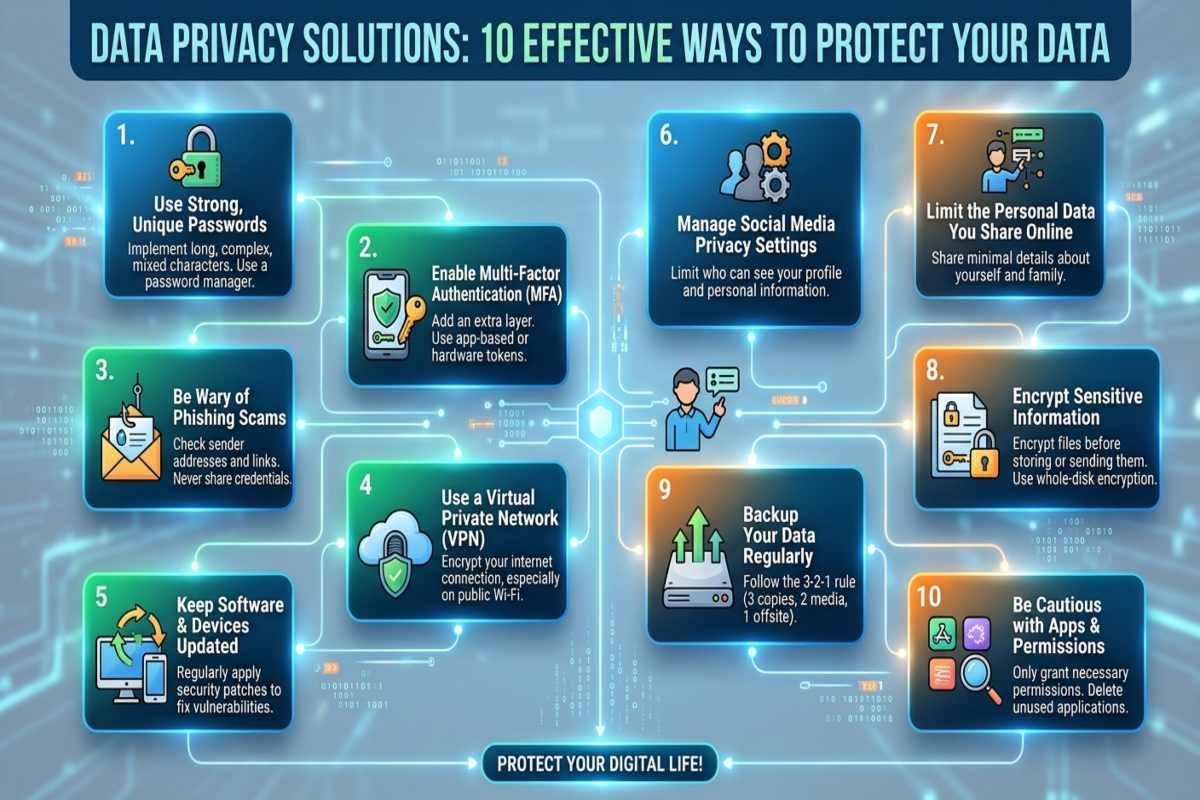
10 Effective Data Privacy Solutions to Protect Your Data
1. Use Strong Passwords and Multi Factor Authentication
Strong passwords help prevent unauthorized access to email accounts, cloud storage, financial services, and business systems, including those used in AI Supply Chain Security. Use a unique password for every important account and consider a reputable password manager to generate and store complex credentials securely.
Enable multi factor authentication (MFA) wherever possible. MFA requires an additional verification method, such as an authenticator app or security key, making it harder for attackers to access an account using a stolen password alone.
2. Encrypt Sensitive Information
Encryption converts readable information into a protected format that requires the appropriate cryptographic key to access. It helps protect personal records, financial information, customer databases, and confidential business files when data is stored or transmitted.
Use full disk encryption on supported laptops and mobile devices, HTTPS for websites, and secure encryption features offered by trusted cloud services. Businesses should also establish procedures for managing encryption keys and restricting access to them. Encryption does not eliminate every privacy risk. If an attacker gains access to an authorized account or an unlocked device, encrypted information may still be exposed.
3. Collect and Store Only Necessary Data
Data minimization means collecting and retaining only the information required for a legitimate purpose. The less sensitive data an organization stores, the less information may be exposed if its systems are compromised. For example, an online retailer should evaluate whether it needs to retain customer information after an order is completed. It should avoid storing payment details unnecessarily and establish retention periods based on business requirements and applicable legal obligations.
Regularly review databases, shared folders, customer records, and old backups to identify unnecessary data and address potential OWASP LLM Security Risks associated with sensitive information exposure. Securely delete information that is no longer needed, while preserving records that must legally be retained.
4. Apply Role Based Access Controls
Access controls determine which users can view, modify, download, or delete information. Role based access control (RBAC) assigns permissions according to job responsibilities rather than giving every employee broad access. A customer support representative, for example, may need limited customer account information but should not automatically receive access to payroll records or confidential security reports.
Review permissions regularly, remove access when employees change roles, and promptly disable accounts when access is no longer justified.
5. Use Data Loss Prevention Tools
Data loss prevention (DLP) tools help organizations identify, monitor, and control sensitive information moving through endpoints, networks, email, and cloud applications. Depending on their configuration, these tools can flag or block attempts to share protected information through unauthorized channels. A business might configure DLP policies to warn employees when they attempt to email a spreadsheet containing customer records to an external address.
However, DLP tools are not a complete privacy strategy. As part of an AI Security Checklist, organizations should establish accurate policies, implement appropriate monitoring, conduct regular testing, and handle employee data carefully to avoid unnecessary surveillance or excessive restrictions.
6. Secure Cloud Storage and Connected Applications
Cloud storage makes information easier to access and collaborate on, but incorrect permissions and compromised accounts can expose sensitive files. Review sharing settings, restrict public links, enable MFA, and use access logs where available.
Businesses should also evaluate third party applications before connecting them to company systems. Check the permissions an application requests, the information it collects, its retention practices, and how access can be revoked. These precautions are especially important when cloud services support Supply Chain Planning, customer management, or other business processes that depend on information shared between multiple organizations.
7. Keep Devices and Software Updated
Outdated operating systems, browsers, applications, and network devices may contain known security vulnerabilities. Attackers can exploit some of these weaknesses to gain access to systems or steal sensitive information.
Enable automatic updates where appropriate, prioritize security patches for internet facing systems, and remove software that is no longer supported. Businesses should maintain an inventory of devices and applications so that important updates are not overlooked. Software updates cannot prevent every attack, but timely patching reduces exposure to vulnerabilities that vendors have already addressed.

8. Back Up Data and Test Recovery Procedures
Secure backups help organizations recover important information after ransomware incidents, accidental deletion, hardware failures, or other disruptive events. As part of a Modern Cybersecurity strategy, maintain backups that are protected from unauthorized access and, where practical, isolated from the primary environment.
Use a documented backup schedule based on how much data the organization can afford to lose. Periodically test restoration procedures rather than assuming that a completed backup will always be recoverable. Backups also require privacy protections. Encrypt them where appropriate, restrict access, and apply retention and deletion rules to prevent old sensitive records from remaining available indefinitely.
9. Train Employees to Recognize Privacy and Security Risks
Human error, social engineering, and unsafe data sharing practices can undermine technical safeguards. Employees should understand how to identify suspicious messages, verify requests for sensitive information, handle customer records, and report possible incidents.
Training should cover phishing, impersonation, secure file sharing, password security, and the safe use of AI applications. Employees should know that confidential information must not be pasted into an AI system unless the tool and its approved use are appropriate for that data. For organizations adopting AI Agent Security controls, training should also explain the risks of granting automated agents excessive permissions or access to sensitive records.
10. Monitor Threats and Prepare an Incident Response Plan
Privacy protection requires ongoing monitoring, not just a one time security setup. Review authentication logs, unusual downloads, unexpected permission changes, and alerts from security systems to identify suspicious activity. An incident response plan should explain how to contain an incident, preserve relevant evidence, assess the information affected, restore secure operations, and determine whether notifications are legally required.
AI Threat Intelligence can help security teams understand emerging attack techniques and prioritize relevant risks. When AI powered systems are involved, teams should also consider prompt injection, data leakage, and other application specific threats.
How Should You Choose the Right Data Privacy Solutions?
The best approach depends on the sensitivity of the data, the number of people who can access it, and the risks associated with the systems that store or process it.
| Requirement | Recommended Solution |
|---|---|
| Protect online accounts | Password manager and MFA |
| Secure confidential files | Encryption and restricted permissions |
| Prevent unnecessary data exposure | Data minimization and retention policies |
| Protect customer databases | Access controls and monitoring |
| Secure cloud applications | Sharing restrictions and configuration reviews |
| Recover after an incident | Protected backups and tested recovery plans |
| Manage AI related privacy risks | Data governance and AI security testing |
Small businesses can begin with basic controls and expand their security measures as their systems and risks grow. Organizations seeking a structured approach can use the voluntary NIST Privacy Framework to identify and manage privacy risks.
Common Data Privacy Mistakes to Avoid
Even organizations with security software can expose sensitive information through poor configuration or inconsistent practices.
- Keeping Data Indefinitely: Old customer records and unused files create unnecessary exposure.
- Giving Excessive Permissions: Employees and applications should not have unrestricted access by default.
- Assuming Encryption Solves Everything: Stolen credentials and compromised devices can still expose information.
- Ignoring Third Party Risks: Vendors and connected applications may have access to confidential data.
- Failing to Best Backups: A backup is useful only if the organization can restore its data successfully.
- Overlooking AI Applications: Sensitive information entered into unapproved AI tools may create additional privacy risks.
Businesses should regularly review these weaknesses and prioritize corrective actions based on the sensitivity of the information and the likelihood and potential impact of exposure.
How Do Data Privacy Solutions Apply to AI Systems?
AI applications introduce additional privacy considerations because they may process customer records, source code, documents, prompts, and information retrieved from external systems. Organizations should establish clear rules for which data AI systems can access, where that information is processed, and whether it may be retained by a provider.
An Agentic AI Attack may exploit excessive permissions or weaknesses in connected tools to access or disclose information. Prompt injection and sensitive information disclosure are among the risks addressed by the OWASP GenAI Security Project. Its 2026 LLM risk framework provides a useful reference for evaluating AI application security.

Conclusion
Effective data privacy solutions combine technology, responsible data handling, and consistent security practices. Organizations can reduce exposure by collecting less information, restricting access, encrypting sensitive records, training employees, and preparing for security incidents.
Start by identifying the most sensitive information you hold, reviewing who can access it, and addressing the biggest risks first. For more practical guidance, explore related AI Security Checklist, data protection, and cybersecurity resources on AiSecMaster.
Frequently Asked Questions (FAQs)
What are the most effective data privacy solutions?
The most effective solutions combine strong authentication, encryption, least privilege access controls, data minimization, secure backups, employee training, and incident response planning. The right combination depends on the data being protected and the risks facing the individual or organization.
How can I protect my personal data online?
Use unique passwords, enable MFA, keep devices updated, limit the personal information you share, review application permissions, and avoid suspicious links. Check privacy settings on social media and online accounts, and monitor important accounts for unexpected activity.
Which data privacy solutions are best for small businesses?
Small businesses should start with MFA, password management, device encryption, regular software updates, restricted access to customer information, secure backups, and employee awareness training.
What is the difference between data privacy and data security?
Data privacy concerns how personal information is collected, used, shared, retained, and deleted. Data security focuses on protecting information against unauthorized access, alteration, loss, or disclosure.
Do businesses need data privacy solutions to comply with US laws?
Businesses may have legal obligations depending on their industry, location, activities, and the types of information they handle. Applicable requirements may arise under laws such as the California Consumer Privacy Act, as amended by the California Privacy Rights Act, or sector specific federal laws.